


Organizing your content with heading styles helps readers skim the page and understand the hierarchy of information you are presenting. It especially is important to individuals using screen readers, providing a simple method to navigate within a page or a document. It even helps search engines understand your pages better, so people searching for your content on a site like Google will receive an accurate and structured result!
Using different heading styles and font sizes helps organize information into meaningful sections and demonstrates how subtopics relate to the main topics, and with one another. For example, a document structure could be:
- Heading 1 is the main topic or title of the content
- Heading 2 is used for major subtopics that relate to the main content
- Heading 3, Heading 4, and Heading 5 could be used to further refine related subtopics
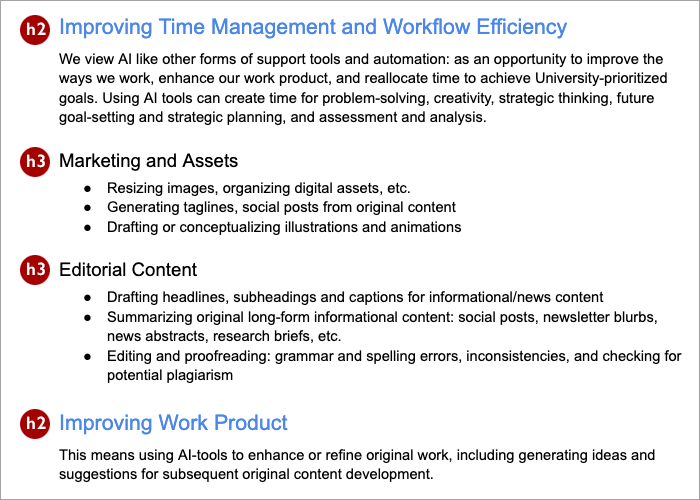
The screenshot above reveals the heading structure of the document, identifying heading 2 and heading 3 elements.
General rules for headings
- The main title should always be formatted as Heading 1. Subsequent headers should be applied in descending order. Don’t skip heading levels. In most document editors such as Google Docs and Words, you can change the appearance of heading styles; this may not be the case with websites.
- Don’t use font size, bold, or underline features to create the appearance of a heading.
Lists
Bulleted and numbered lists can be used in documents to format, arrange, and emphasize text. For an individual using assistive technology, such as a screen-reader, the list format will communicate the presence and number of items in the list when navigating the content. This can help a person understand the overall scope of the list information and the number of items involved.
Bulleted List
If items are a group of equivalent ideas or terms, and the order is not an essential aspect of the concept, use a bulleted list. For example, the following is a list of basic accessibility practices for electronic documents:
- Organize material into usable sections
- Use styles to mark headings
- Use meaningful words to identify hyperlinks
- Provide text descriptions (i.e., alt text) for images
All of these accessibility practices are relevant to creating an accessible document. As such, a bulleted list can be used as it does not require a specific order or a sequence to follow.
Numbered List
If items are a sequence or a series of steps, use a numbered list. A numbered list is important when there are specific steps to perform as part of a process. For example, the following is a list of steps to take to login to email:
- Open your web browser
- Navigate to the email login page
- Enter your user name and password
- Press the Submit button
In this example, following a specific sequence of steps is necessary to completing the task successfully. When a specific order of operation is necessary to completing a task, then a numbered list is more effective in communicating those steps.