


Introduction
An end user can run reports using such restrictive prompt values that the query(ies) returns no data at all. When a user sees a blank report, they may think that something is wrong with Cognos Analytics and not realize there is no data to match their prompt selections.
Instead of displaying a blank report page, you can display a message to the user with the No data contents property.
This property is available for the following data container types:
- lists
- crosstabs
- charts
- maps
- repeaters
- repeater tables
- tables of contents
Procedure
- On your report page, click a data container (such as a list, crosstab, chart, map, repeater, repeater table, or table of contents).
- In the Properties pane, click the No data contents ellipses.
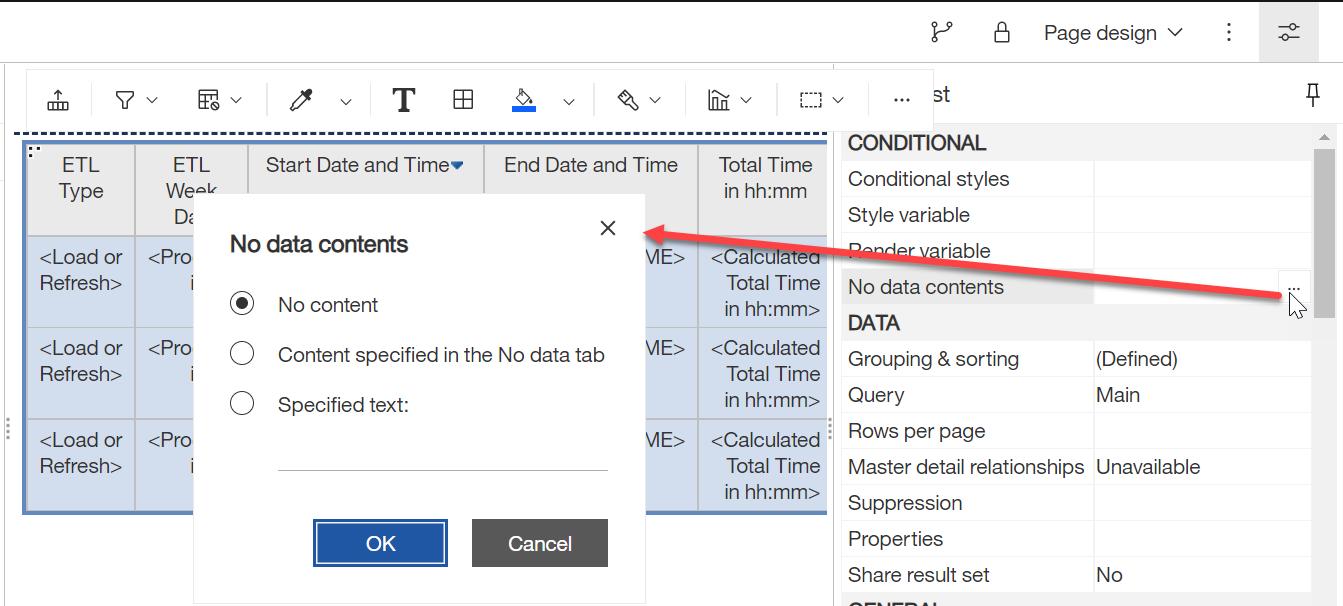
- Select what you want the user to see when there is no data to show the user.
Value When there is no data, use this option to show the user... No content a blank report page Content specified in the No data tab something other than simple text (like an image) Specified text Customizable text. By default, "No Data Available" will appear, but you can override this text with your own.
Tip : Consider entering a helpful message like the following.
No data returned. Try re-running the report with less restrictive prompt values.
Related: Specify what appears for data containers that contain no data (IBM)