


Images on web pages sometimes convey important information. Alternative text, called alt text for short, provides a text equivalent of the information presented visually. Alt text is an important way to make sure everyone can understand the content of your page.
Alt text should be:
- Accurate: including spelling, grammar, and proper punctuation.
- Concise: using the fewest words possible while providing a meaningful description for the image.
- Equivalent: presenting the same content and/or function of the image.
Assistive technologies will announce when an object is an image, so including this information is redundant and not necessary.
Tips for writing effective alt text
- Describe the image as specifically as possible
- Keep it short
- Don't include "image of," "picture of," "graphic of" etc.
- Don't include the file extension, .jpg or .png, .gif, etc.
- Image buttons should have an alt attribute that describes the function of the button like, "search," "donate," “sign up,” etc.
Photos
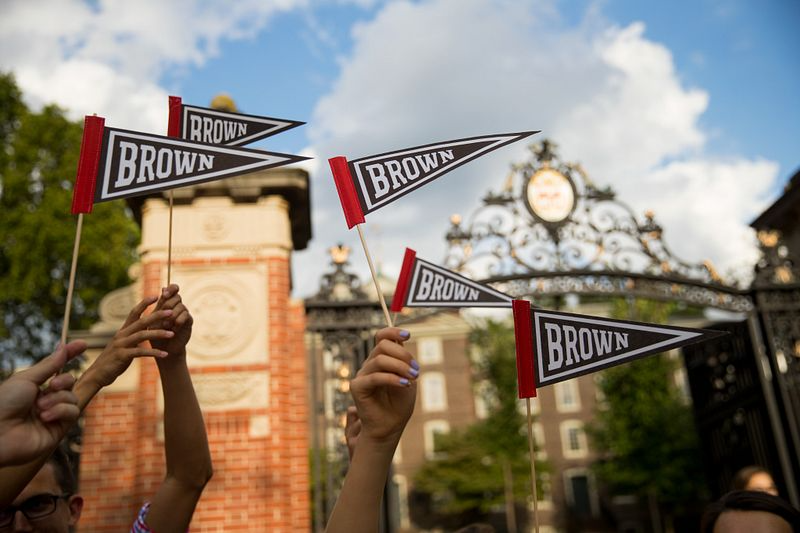
The alt text will depend on the context and intention of the image. For the image below, the alt text could be "Hands of students fly small Brown University pennants in front of the Van Wickle Gates during Commencement."
Buttons and Icons
There are times when images function as a symbol or initiate an action, such as performing a search or submitting a form. In these cases, the alt text should clearly communicates the action, function or destination, rather than the visual aspects of the image itself. For example, for the icon below, the alt text could read "Delete."

Note: Do not use images for buttons that simply act as links to other pages or documents.
Graphs, charts and infographics
Graphs, charts and infographics are known as complex images and impart much more information than can be captured in brief alt text. Because of their complexity, they require both a concise description for immediate context and a detailed description.
Concise Description: This is added via the alt text attribute, but rather than describing the context or the visuals of the image, the concise description should reflect the name of the chart or other high-level identifying description.
Detailed Description: The detailed description should provide a comprehensive account of the information reflected in the image, including key points, conclusions, numeric or tabular data, and visual or textual elements. Detailed descriptions can be added via several methods. For more information about complying with the detailed description requirement, email [email protected].
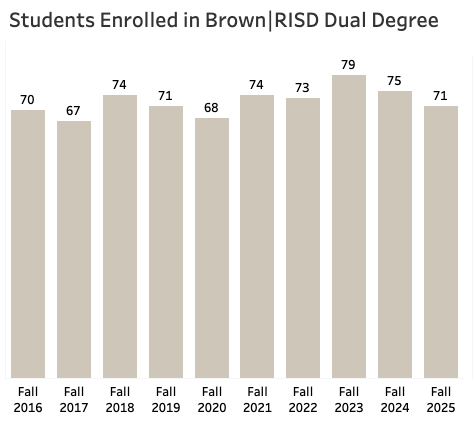 Example of a complex image
Decorative Images
If an image is purely decorative "eye candy" that doesn't convey meaning, or a decorative element like a section break, give it an ALT text of alt=”” (quotes with nothing in between).
It's important to do this instead of leaving out the alt attribute entirely - without this empty alt attribute, screen reading programs will attempt to ‘guess’ as to what the information is by reading other elements, such as the file name of the image.
A decorative image showing an aerial view of Brown and Providence.
Images as links
The alt text guidelines for images used as links differ slightly than normal images. For details on alt text for images as links, reference theImage Links section of the Create Accessible Links guide.